

1.Getting Started
The major difference with the previous PD4ML versions is that the new API performs the conversion in two phases.
First you need to invoke readHTML() method to read a source document. By default an HTML (styled with CSS) is expected. However it can be arbitrary XML, where tag nature is specified with CSS display property, e.g. <sideblock style="display: block; float: right">Side content</sideblock>.
After the document is read and parsed you can render and write it as PDF, PDF/A, DOCX, RTF or an raster image with writePDF() or another corresponding method. If you need a conversion result in different formats – invoke corresponding write*() methods multiple times, there is no need to reread the source HTML.
That’s all you need to know about PD4ML to write your first converter application…
PD4ML pd4ml = new PD4ML();

String html = "TEST<pd4ml:page.break><b>Hello, World!</b>";
ByteArrayInputStream bais =
        new ByteArrayInputStream(html.getBytes());

// read and parse HTML
pd4ml.readHTML(bais);

File pdf = File.createTempFile("result", ".pdf");
FileOutputStream fos = new FileOutputStream(pdf);

// render and write the result as PDF
pd4ml.writePDF(fos);

// alternatively or additionally:
// pd4ml.writeRTF(rtfos, false);
// pd4ml.writeDOCX(docxos);
// BufferedImage[] images = pd4ml.renderAsImages();

// open the just-generated PDF with a default PDF viewer
Desktop.getDesktop().open(pdf);
2.Obtaining PD4ML
Since v4 PD4ML is distributed as an universal library, whose features like TTF embedding support or PDF/A output are activated depending on license key. So binaries for all license types can be obtained from a single location.
Each PD4ML v4.x release is published to our Maven repository. You may either download the library from the location or, if you use Apache Maven, tune your project build to automatically download the latest library build.
The binaries in the repository are supplied with Javadoc JARs. The most actual Javadoc is always available online.
PD4ML source code licensees also have an access to debugger-friendly library versions with debug info not stripped off. The library versions and their source code JARs are available from the access-restricted Maven repository.
Nightly builds are available in both repositories as snapshots.
To use PD4ML in Maven environment you’d need to configure something like that:
1. Access to regular binaries
Project pom.xml
...
<dependncy>
	<groupId>com.pd4ml</groupId>
	<artifactId>pd4ml</artifactId>
	<version>4.0.0</version>
</dependency>
...
<repository> <!-- move the section to settings.xml, if desired -->
	<id>pd4ml</id>
	<url>https://pd4ml.com/maven2/</url>
	<snapshots>
		<enabled>true</enabled>
	</snapshots>
</repository>
2. Access to the binaries with source code
~/.m2/settings.xml
<server>
	<id>pd4ml-src</id>
	<username>login_name_from_license</username>
	<password>password_from_license</password>
</server>
Of course, it is recommended to store the password in encrypted form there. See Maven documentation how to do that.
Project pom.xml
...
<dependncy>
	<groupId>com.pd4ml</groupId>
	<artifactId>pd4ml</artifactId>
	<version>4.0.0</version>
</dependency>
...
<repository>
	<id>pd4ml-src</id>
	<url>https://pd4ml.com/maven2-src/</url>
	<snapshots>
		<enabled>true</enabled>
	</snapshots>
</repository>
3.Running PD4ML Converter as a standalone application
PD4ML is not only a software library/component, but also a set of tools, which can be used as standalone applications.
First download the most recent version of PD4ML JAR file from our Maven repository, save it to a directory of your choice and make sure there is a JRE v1.7+ installed on your workstation/server.
There are two tools available:
- Pd4Cmd – command line wrapper of PD4ML API
- PD4Browser – GUI viewer/converter
3.1.PD4ML as a command-line converter tool
The command line tool is implemented as com.pd4ml.tools.Pd4Cmd.class. The class is specified as a main class of the JAR, so it can be executed a simple way:
java -jar pd4ml*.jar
where java*.jar is an actual JAR file name, like pd4ml-4.0.4.jar.
There are four typical usage scenarios:
- HTML conversion to PDF, DOCX, RTF or a raster image
- PDF processing (merging, updating)
- Reading of document meta information
- Indexing of TTF fonts
HTML conversion to PDF, DOCX, RTF or a raster image
HTML-to-PDF conversion with the absolute minimum of parameters
java -Djava.awt.headless=true -Xmx512m -jar pd4ml.jar "http://pd4ml.com" 1200
- The command line overrides the default Java memory heap size limit with -Xmx512m. Here it is set to 512Mb.
- On UNIX platform
-Djava.awt.headless=trueallows to run the application on non-graphics-enabled servers or from remote ssh/telnet sessions. http://pd4ml.com" 1200are HTML source URL and htmlWidth (virtual “browser” frame width) parameters.
Note: on Win32 the URL is enclosed, if needed, to double quotes, on UNIX – to single quotes.
- The default PDF document format: A4 / PORTRAIT
- In the example 1200px width of rendered document will be mapped to 595pt widths of A4 page format.
As long as an output file path omitted, the output is sent to STDOUT and can be piped to another application.
Customized HTML-to-PDF conversion
java -Djava.awt.headless=true -Xmx512m -jar pd4ml.jar "http://pd4ml.com" 1200 LETTER -bookmarks HEADINGS -pdfforms -debug -out pd4ml.pdf
- In the examples the generated PDF is written to a file, defined with -out parameter. That makes possible to use STDOUT for debug output (-debug parameter).
- The examples also force PD4ML to produce PDF outlines (bookmarks) from
<h1>-<h6>hierarchy of the document (-bookmarks HEADINGS) and to convert HTML forms to interactive PDF forms (-pdfforms).
PDF processing (merging, updating)
PDF page removal
java -Djava.awt.headless=true -Xmx512m -jar pd4ml.jar -tools file:c:/docs/test.pdf -pagerange 2-3,5+ -out c:/docs/newdoc.pdf
The call extracts a selected range of document pages and saves them as a new document.
PDF documents merge
java -Djava.awt.headless=true -Xmx512m -jar pd4ml.jar -tools file:c:/docs/test.pdf -merge file:c:/docs/tomerge.pdf after -out c:/docs/newdoc.pdf
Note: -pagerange option is not available by a PDF merge
PDF permissions update
java -Djava.awt.headless=true -Xmx512m -jar pd4ml.jar -tools file:c:/docs/test.pdf -permissions 28 -out c:/docs/newdoc.pdf
-permissions 28 is a sum of permissions: AllowDegradedPrint = 4, AllowModify = 8 and AllowCopy = 16.
See API reference for more details…
Reading of document meta information
java -Djava.awt.headless=true -Xmx512m -jar pd4ml.jar -tools file:c:/docs/test.pdf -printpermissions -printauthor -printtitle -printpagenum
The call prints to STDOUT basic PDF info: document permissions (as a hex number), document author, document title, number of document pages (decimal number)
Indexing of TTF fonts
java -Xmx512m -jar pd4ml.jar -configure.fonts <fontdir> [pd4fonts.properties location]
See the command line tool documentation…
3.2.PD4ML as a GUI application
PD4ML library includes a simple GUI tool for HTML document rendering preview and for test conversion to PDF, DOCX or to RTF.
The tool can be activated by a passing -gui parameter to the command line:
java -jar pd4ml*.jar -gui
where java*.jar is an actual JAR file name, like pd4ml-4.0.1.jar.
There is also a “legacy” way to run the GUI converter, kept for backward compatibility with PD4ML versions prior to v4.0.0
java -cp pd4ml*.jar org.zefer.pd4ml.tools.PD4Browser
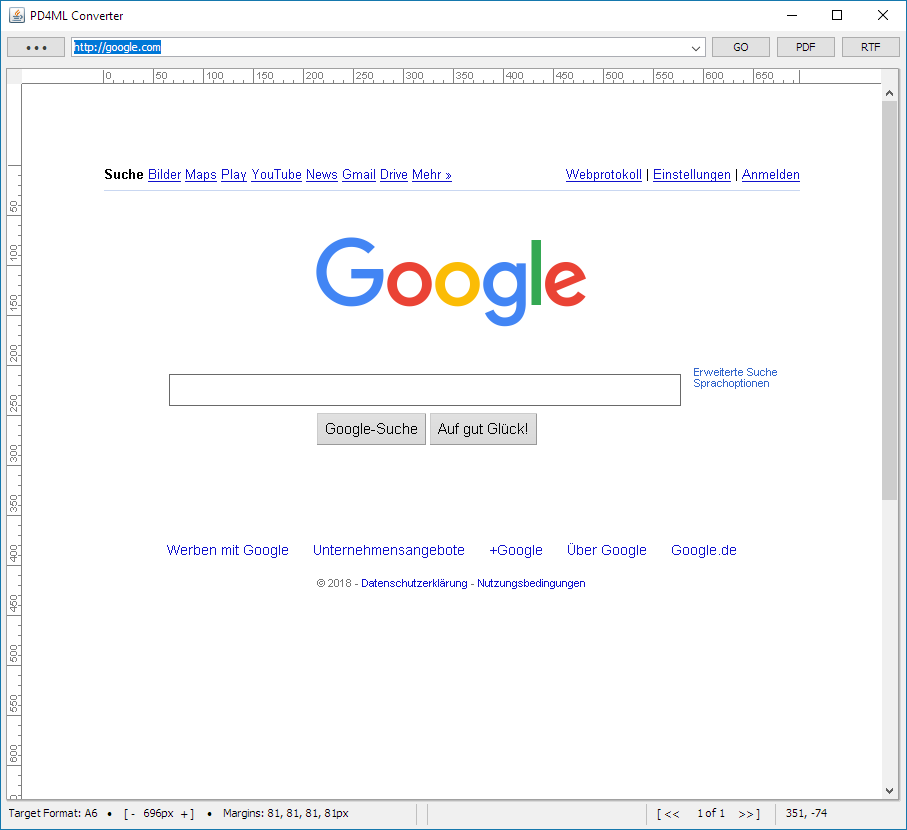
After the first start the GUI tool creates
pd4browser.propertiesfile (if no previously created instance found) with the conversion parameter defaults. The file can be customized according your needs in a text editor.
In the top section of the application you can find the controls:
[•••]– local HTML file open dialog. Accepts.htm(l)and.svg(and.dxlfrom v4.1.0)[GO]– reloads current document and render it in the main application view as an image[PDF]– renders current document as PDF and opens it in default PDF viewer application[RTF]– renders current document as RTF and opens it in default RTF viewer application[DOCX]– renders current document as DOCX and opens it in default DOCX viewer application
In the status bar there are:
- A label with the target page format. The target file format can be changed in
pd4browser.propertiesfile or in the source HTML/CSS with@pageat-rule - A label with the actual
htmlWidthconversion parameter value. The value can be changed by a horizontal resizing of the application window. For a fine tuning there are[+and-]buttons - Target page margins. The margins can be changed in
pd4browser.propertiesfile or in the source HTML/CSS with@pageat-rule. - Current page number label with page browse buttons
[<<[/java] and [java]>>] - Mouse position / drag box coordinates
A pointing of the mouse over the status bar labels opens a balloon with additional details.
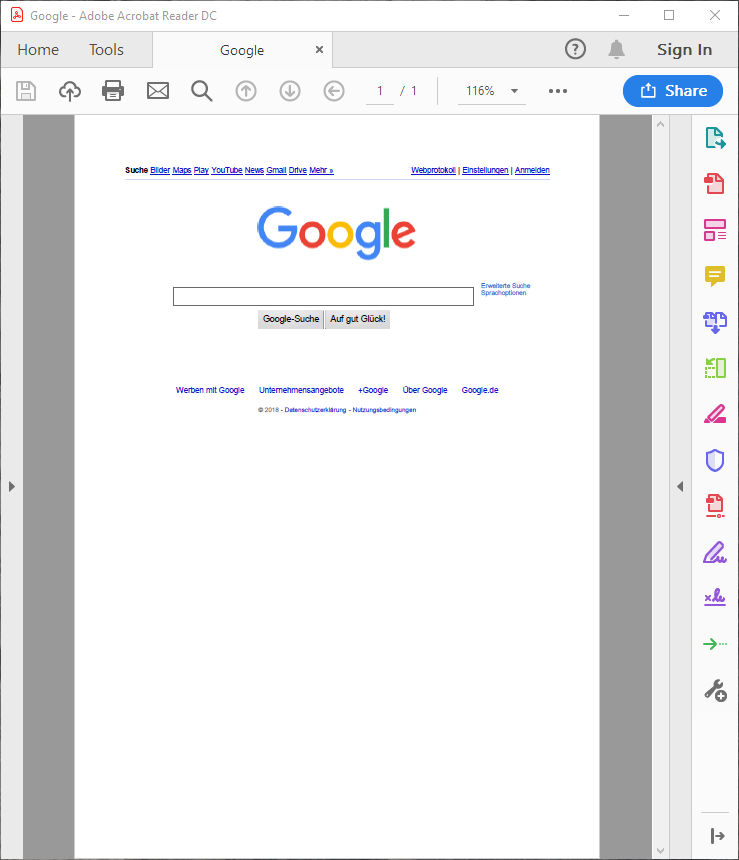
A clicking [PDF] button converts current document to PDF and open the resulting file in a separate PDF viewer window:
The conversion defaults can be adjusted in pd4browser.properties. The default properties still include some entries, inherited from older PD4ML versions, and not always usable in v4.0.0.
Here we’ll review the important ones.
debug.info.enable=0– logging/debug output verbosity. The value is a bit mask to control logging aspectsdocument.author=– a string to override document author metadatadocument.title=– a string to override document title metadatainsets.bottom=10– bottom page margin valueinsets.left=10– left page margin valueinsets.right=10– right page margin valueinsets.top=10– top page margin valueinsets.units=mm– margin value units:mmorptpage.bookmarks.destinations=false– enables a generation of PDF page bookmarks (outlines) from named anchors (<a name="an1"/>). Not compatible withpage.bookmarks.headings=truepage.bookmarks.headings=false– enables a generation of PDF page bookmarks (outlines) from<H1>-<H6>hierachy. Not compatible withpage.bookmarks.destinations=truepage.format=A4– specified target page format (e.g.A6,LETTER)page.hyperlinks=true– enables a conversion of HTML hyperlinks to active PDF hyperlinkspage.orientation=false– bytruerotates given target page format to 90 degrees (e.g. portrait to landscape)pdf.forms.enable=false– enabled a conversion of HTML forms to submittable native PDF forms.pdf.pdfa=false– enables PDF/A outputpdf.protect.pud=false– forces PD4ML to keep HTML object sizes given in physical units (mm, pt, in etc) in resulting PDF, independently on HTML-to-PDF scale factorproxy.host=– proxy host address (if needed)proxy.port=0– proxy port (if needed)style.add=– CSS style string to be applied to loaded documentsttf.fonts.default.monospace=– default monospaced font. Not recommended, use CSS style for that insteadttf.fonts.default.sansserif=– default Sans Serif font. Not recommended, use CSS style for that insteadttf.fonts.default.serif=– default Serif font. Not recommended, use CSS style for that insteadttf.fonts.dir=– location of TTF fonts dir directory withpd4fonts.propertiesindex fileuserSpace.adjustToContent=false– iftrue, forces PD4ML to sethtmlWidthvalue to the measured width of the HTML content.
4.PD4ML Java API
API Documentation
Each release of PD4ML comes with actual JavaDocs. When you use Maven for dependency management, your IDE will automatically download the JavaDocs JARs and when you hover on a PD4ML class or method, show you the corresponding documentation.
For reference we also publish the API documentation online so you can link to it from emails or websites: https://pd4ml.com/javadoc/com/pd4ml/PD4ML.html
Pre-Requisites
The following are the pre-requisites needed to use the PD4ML Java API library:
* JDK installed on your PC
* Apache Maven build automation tool
* Eclipse installed on your PC (While Eclipse is not compulsory it is highly recommended)
* PD4ML Java API can be downloaded from our website directly (or let Maven do that automatically)
* PD4ML evaluation license
Developing your first application
Creating blank Maven Java project
As a good starting point we recommend to create a blank Java project as described in the tutorial:
https://maven.apache.org/guides/getting-started/maven-in-five-minutes.html
After you’ve got the example application to run, let’s add to it PD4ML.
First add PD4ML library dependency to project’s pom.xml. See lines 17-22 below:
<project xmlns="http://maven.apache.org/POM/4.0.0" xmlns:xsi="http://www.w3.org/2001/XMLSchema-instance"
	xsi:schemaLocation="http://maven.apache.org/POM/4.0.0 http://maven.apache.org/maven-v4_0_0.xsd">
	<modelVersion>4.0.0</modelVersion>
	<groupId>com.mycompany.app</groupId>
	<artifactId>test-pd4ml</artifactId>
	<packaging>jar</packaging>
	<version>1.0-SNAPSHOT</version>
	<name>test-pd4ml</name>
	<url>http://maven.apache.org</url>
	<dependencies>
		<dependency>
			<groupId>junit</groupId>
			<artifactId>junit</artifactId>
			<version>3.8.1</version>
			<scope>test</scope>
		</dependency>
		<dependency>
			<groupId>com.pd4ml</groupId>
			<artifactId>pd4ml</artifactId>
			<version>[1.0.0,)</version>
		</dependency>
	</dependencies>
	<build>
		<plugins>
			<plugin>
				<groupId>org.apache.maven.plugins</groupId>
				<artifactId>maven-compiler-plugin</artifactId>
				<version>3.1</version>
				<configuration>
					<!-- or whatever version you use -->
					<source>1.7</source>
					<target>1.7</target>
				</configuration>
			</plugin>
		</plugins>
	</build>
	<repositories>
		<repository> <!-- move the section to settings.xml, if desired -->
			<id>pd4ml</id>
			<url>https://pd4ml.com/maven2/</url>
			<snapshots>
				<enabled>true</enabled>
			</snapshots>
		</repository>
	</repositories>
</project>
In order to resolve the dependency, add a location of PD4ML repository. The right location for the repository address is $HOME/.m2/settings.xml (See Maven documentation). We’ll keep the example configuration simpler and add the repository info to pom.xml, despite it is not a recommended practice. See lines 37-45 in the example above.
If you own PD4ML license with product source code access, use
https://pd4ml.com/maven2-src/as the repository URL. You would also need to configure the repository access credentials (login/password pair) obtained from the license email.
Also for runtime environment simplicity we’ll add the example PD4ML API calls to the application test suite. A typical test case class looks like the example:
public class AppTest extends TestCase {
	public AppTest(String testName) {
		super(testName);
	}

	public static Test suite() {
		return new TestSuite(AppTest.class);
	}

	public void testApp() {
	}
}
We are going to extend testApp() method with PD4ML usage example code.
Creating a PD4ML object
When writing an application with PD4ML API, the very first thing to do is to create the PD4ML object:
try {
	PD4ML pd4ml = new PD4ML();
} catch (Exception e) {
	e.printStackTrace();
}
The constructor in the example has no parameters and it expects to find license pd4ml.lic file in the working dir of the application or in the root folder of the classpath or of pd4ml*.jar.
Alternatively you may pass to PD4ML constructor a string with a serial number (obtained from the license email) or a string with an URL of an alternative pd4ml.lic location.
Where to obtain pd4ml.lic? Download it from your license page or save the serial number from the license email to a text file and name the file pd4ml.lic
Reading HTML
After you’ve got an instance of PD4ML you can read and parse a source HTML document with one of a variety of readHTML() methods.
In the example it reads from a prepared input stream. But it can also read from an arbitrary URL.
String html = "<b>Hello, <i>World!</i></b>";
ByteArrayInputStream bais =
new ByteArrayInputStream(html.getBytes());

// read and parse HTML
pd4ml.readHTML(bais);
If you want to point the converter to a font directory or to apply an additional style, headers, footers, watermarks etc – the corresponding API calls need to be performed before readHTML()
Writing target format
A parsed source document can be rendered as a sequence of images, PDF, DOCX or RTF documents.
Here it writes a PDF:
File pdf = File.createTempFile("result", ".pdf");
FileOutputStream fos = new FileOutputStream(pdf);

// render and write the result as PDF
pd4ml.writePDF(fos);
Launching default document viewer (optional)
It is rarely needed in real-life applications, but very handy in our case: lookup for a default viewer and launch it for just generated PDF.
// open the just-generated PDF with a default PDF viewer
Desktop.getDesktop().open(pdf);
It looks for a viewer, associated with given file extension. For PDF it launches Adobe Reader (or similar). If we write to a file with .rtf extension it likely launches MS Word or WordPad
First PD4ML application complete
The application, in its entirety, is as follows:
package com.mycompany.app;

import java.awt.Desktop;
import java.io.ByteArrayInputStream;
import java.io.File;
import java.io.FileOutputStream;

import com.pd4ml.PD4ML;

import junit.framework.Test;
import junit.framework.TestCase;
import junit.framework.TestSuite;

public class AppTest extends TestCase {
	public AppTest(String testName) {
		super(testName);
	}

	public static Test suite() {
		return new TestSuite(AppTest.class);
	}

	public void testApp() {
		try {
			PD4ML pd4ml = new PD4ML();

			String html = "<b>Hello, <i>World!</i></b>";
			ByteArrayInputStream bais =
				new ByteArrayInputStream(html.getBytes());

			// read and parse HTML
			pd4ml.readHTML(bais);

			File pdf = File.createTempFile("result", ".pdf");
			FileOutputStream fos = new FileOutputStream(pdf);

			// render and write the result as PDF
			pd4ml.writePDF(fos);

			// alternatively or additionally:
			// pd4ml.writeRTF(rtfos, false);
			// pd4ml.writeDOCX(docxos);
			// BufferedImage[] images = pd4ml.renderAsImages();

			// open the just-generated PDF with a default PDF viewer
			Desktop.getDesktop().open(pdf);

		} catch (Exception e) {
			e.printStackTrace();
		}
	}
}
Running the application
Now we are ready to run the demo application.
Go to the Maven project root (where pom.xml is) and execute the command line:
mvn test
The test target builds the projects and runs its test suite. As our example code is implemented as a test case, it will be executed. If you did everything correct you’ll see a PDF viewer window with a generated PDF file in it:
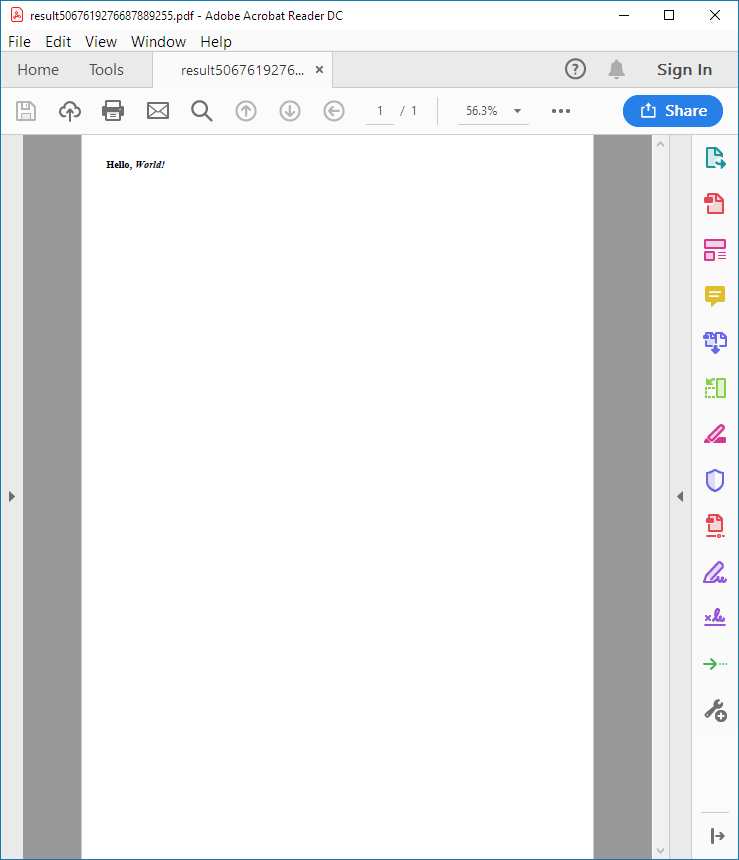
The document is minimalistic and built using PD4ML defaults: A4 page format, 10mm margins, 727px htmlWidth, no TTF fonts.
727px are calculated from
(A4.width - margins.left - margins.right) * PIXELS_PER_POINT, which is(595pt - (10mm + 10mm) * 2.835pt/mm) * 1.35px/pt
Customizing the conversion
PDF page format and content scaling
There are 3 important PD4ML properties, impact resulting PDF page format and layout: pageSize, pageMargins, htmlWidth.
pageSize defines output paper format: A4, ISOB4, LETTER, LEGAL etc.
Corresponding constants are defined in java.pd4ml.Constants class, but you may define any non-standard page dimension with, for instance, new com.pd4ml.PageSize(400,400) (by default the dimensions are in typographic points) and pass it to pd4ml.setPageSize() method.
Default page format is A4, orientation portrait.
PDF file format does not explicitly specifies on meta level if a particular page is landscape– or portrait-oriented. If a page has its width greater than height – it is landscape, otherwise it is portrait. com.pd4ml.PageSize implements a page rotation by a simple swapping of page height and width.
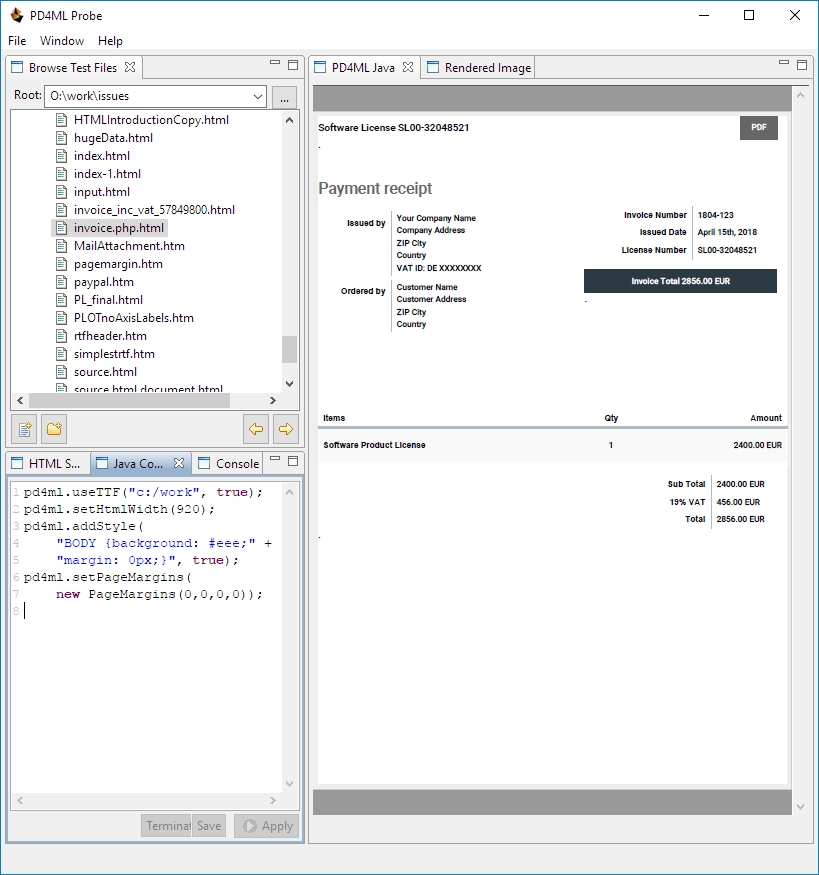
pageMargins define blank page area width around the page content. The default value for it new PageMargins(10, 10, 10, 10, Units.MM)
The page margins can be additionally increased by HTML document margins (e.g. <body style="margin: 50px">). The HTML document margins have some specifics, when converted to PDF: the top margin is applied to the top of the document (in other words, on the first page only), the bottom margin on the last page only.
Document with no margins:
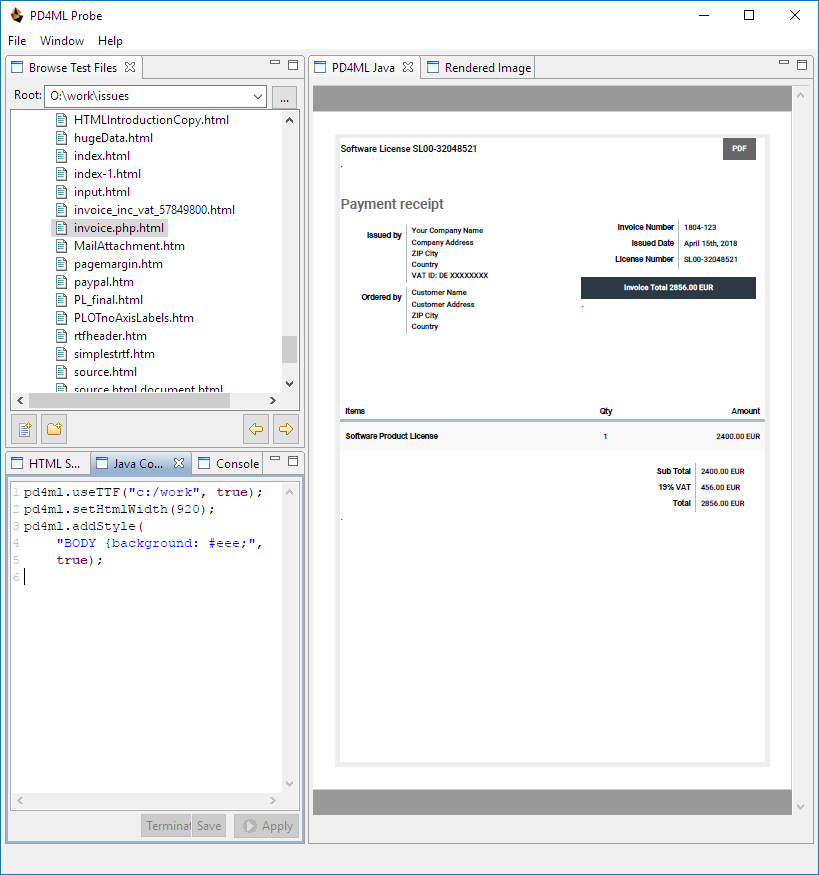
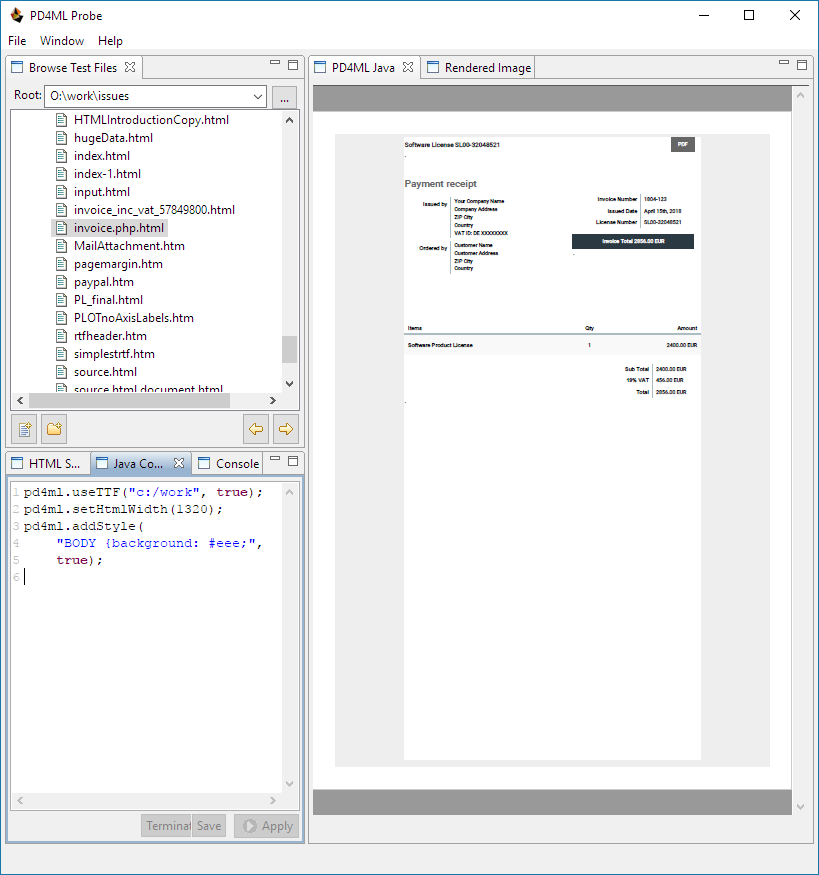
htmlWidth value defines "virtual web browser" frame width (in screen pixels), and by default for A4 it is 727px (to keep 1:1 scale factor by 72dpi).
PD4ML renders source HTML page using htmlWidth parameter and maps the resulting layout to the efficient PDF page width (which is pageFormat.width - pageMargins.left - pageMargins.right).
That makes HTML-to-PDF scale factor computed like that:
scale = (pageFormat.width - pageInsets.left - pageInsets.right) / htmlWidth
From the above it is obvious, that an increasing of htmlWidth makes the resulting document content appears smaller.
Examples:
htmlWidth = 920
htmlWidth = 1320
Defining page header and footer
setPageHeader() and setPageFooter() methods are used to define page headers/footers using HTML as a layout definition.
Optional scope parameter allows to apply particular header or footer to a specified range of pages.
The HTML code may include the placeholders: $[page] – to be substituted with current page number; $[total] – total number of pages; $[title] – document title as defined in <title> HTML tag or overridden with setDocumentTitle() API call.
// define page header for the first page 30px high
pd4ml.setPageHeader("$[title]", 30, "1");

// define page footer for the first page
pd4ml.setPageFooter("Total pages: $[total]", 30, "1");

// define page header for the second page
pd4ml.setPageHeader("<b>$[title]</b> $[page]/$[total]", 30, "2+");

// define page footer for the second page
pd4ml.setPageFooter("<div style='width: 100%; text-align: right'>Page: $[page]</div>", 30, "2+");
Protecting resulting document
setPermissions() method allows to apply the standard PDF security options: define a document password or restrict particular document actions (like a hi-res print).
See a list of applicable permission flags (Allow* and DefaultPermissions).
It is possible to define a positive list of permissions:
pd4ml.setPermissions(null, Constants.AllowAnnotate | Constants.AllowDegradedPrint);
or to disable only selected ones:
pd4ml.setPermissions(null, Constants.DefaultPermissions ^ Constants.AllowModify);
// protect the document with "test" password. No permission restrictions applied
pd4ml.setPermissions("test", Constants.DefaultPermissions);
Reading resources from non-standard sources
If some HTML resources like images or stylesheets are not accessible with the standard methods (file read, HTTP(S), etc), you may define your own resource reading “driver”.
First, define a resource addressing syntax, that matches your needs. For example <a src="database:table=pictures;id=4711">
Second, implement a resource loader, which knows what to do with “database:table=pictures;id=4711” URI.
The loader has to be derived from com.pd4ml.ResourceProvider class and to implement two methods: boolean canLoad(String resource, FileCache cache) to test if it can read the URL; BufferedInputStream getResourceAsStream(String resource, FileCache cache) to actually read the resource bytes.
public class DummyProvider extends ResourceProvider {

  public final static String PROTOCOL = "dummy";

  @Override
  public BufferedInputStream getResourceAsStream(String resource, FileCache cache) throws IOException {
    if (!resource.toLowerCase().startsWith(PROTOCOL)) {
      return null;
    }

    // interpret the "resource" parameter according to your protocol (e.g. as a key to a database record etc)

    // in the example we simply dump the resource parameter string
    String buf = "[" + resource.substring(PROTOCOL.length()+1) + "]";
    ByteArrayInputStream baos = new ByteArrayInputStream(buf.getBytes());
    return new BufferedInputStream(baos);
  }

  @Override
  public boolean canLoad(String resource, FileCache cache) {
    if (resource.toLowerCase().startsWith(PROTOCOL)) {
      return true;
    }
    return false;
  }
}

pd4ml.addCustomResourceProvider("advanced.DummyProvider");
5.PD4ML JSP taglib and Web applications
Using PD4ML custom tags in JSP
PD4ML distribution among other features also includes JSP custom tag library. PD4ML JSP custom tags provide a simple mechanism for a converting of HTML or JSP page output into PDF in Web scenarios.
PD4ML JSP taglib deployment
PD4ML tag library classes and the tag library descriptor (TLD) are packaged together in PD4ML JAR file. To make the classes and the TLD accessible for your Web application, you only need to copy pd4ml*.jar library to the lib directory WEB-INF/lib
Using <pd4tl:transform> tag
Once PD4ML custom tags are deployed, its actions can be called from your HTML using an XML syntax.
First, reference a JAR file containing a tag library from your JSP: <%@ taglib uri="http://pd4ml.com/tlds/4.0" prefix="pd4tl" %>
The uri attribute is a unique TLD identifier. It does not point to an existing Web document, but refers to pd4tl.tld file, packaged to pd4ml*.jar and registered there under the same uri identifier.
In PD4ML v4.0.0 we changed the taglib structure and removed some wrapper classes. Now we recommend to use
pd4tl:tag prefix instead of previouspd4ml:in order to distinguish the custom JSP tags from PD4ML proprietary tags (e.g.<pd4ml:page.break>).
Next, you need to surround your HTML or JSP content with <pd4tl:transform> and </pd4tl:transform> tags.
That’s it:
<%@ taglib uri="http://pd4ml.com/tlds/4.0"
  prefix="pd4tl"%><%@page
  contentType="text/html; charset=ISO8859_1"%><pd4tl:transform
  screenWidth="400"
  pageFormat="A5"
  pageOrientation="landscape"
  pageInsets="100,100,100,100,points">
<html>
<head>
<title>pd4ml test</title>
<style type="text/css">
body {
	color: red;
	font-family: Tahoma, "Sans-Serif";
	font-size: 10pt;
}
</style>
</head>
<body>
	<p>
		Hello, World!
	</p>
	<pd4ml:page.break />
	<table style="border: 1px solid gray; border-radius: 5px; background-color: #f8f8f8; color: #000000">
		<tr>
			<td>Hello, New Page!</td>
		</tr>
	</table>
</body>
</html>
</pd4tl:transform>
Comments:
Line 1. Make sure there is no whitespaces before the directive start (before <%@). The taglib is intended to return a PDF (binary) file. Any content or whitespace (incl. new line characters) before <pd4tl:transform> implicitly switches HTTP output to text mode and prefixes the PDF bytes with unexpected characters. As the last resort PD4ML taglib tries to reset such undesired content (if any), but it is not possible in all environments and java.lang.IllegalStateException: getOutputStream() has already been called for this response is thrown.
Other symptoms of the undesired content are either corrupted PDF, or PDF, which is always being reindexed when opened by a PDF Viewer.
Line 2 and 3 No characters or whitespaces between tags or directives allowed (See
%><%[/html] and [html]%><pd4tl:transform[/html]). A reason is as in the comment above.

<b>Line 8</b> From this point there is no whitespace restriction - you may use an arbitrary HTML or JSP code.

<b>Line 23</b> The proprietary tag forces PD4ML converter to insert a page break to the output PDF.

<b>Line 31</b> The closing transform tag. Any content follows the tag is ignored.

Click <a href="/taglib/index.html" target="_new">here</a> to see PD4ML taglib documentation

<h4>Prompt to save just-generated PDF</h4>

By default if you open a PD4ML-enabled JSP with a Web browser, it opens a generated PDF inline (within the browser frame). If you'd like the browser to propose to save the PDF under particular name or open it with the system PDF viewer, add two transform attributes [xml]inline[/xml] and [xml]fileName[/xml]

[html]
<%@ taglib uri="http://pd4ml.com/tlds/4.0"
  prefix="pd4tl"%><%@page
  contentType="text/html; charset=ISO8859_1"%><pd4tl:transform
  screenWidth="800"
  pageFormat="A4"
  pageOrientation="landscape"
  inline="false"
  fileName="file.pdf"
  pageInsets="10,10,10,10,mm">
<html>
<head>
<title>pd4ml test</title>
</head>
<body>
	Hello, World!
</body>
</html>
</pd4tl:transform>
Defining PDF document footer (or header) with JSP custom tag.
Since PD4ML v4.0.0 a dedicated header/footer JSP custom tags are not supported anymore. Instead of it use PD4ML proprietary <pd4ml:page.header> and <pd4ml:page.footer> tags (they take effect not only in JSP context, but also in regular HTML).
Identically you may define a watermark with <pd4ml:watermark> tag.
<%@ taglib uri="http://pd4ml.com/tlds/4.0"
  prefix="pd4tl"%><%@page
  contentType="text/html; charset=ISO8859_1"%><pd4tl:transform
  screenWidth="800"
  pageFormat="A4"
  pageOrientation="landscape"
  pageInsets="10,10,10,10,mm">
<html>
<head>
<title>Page title.</title>
</head>
<body>
<pd4ml:page.header height=30 scope="1">$[title] Visible only on the first page</pd4ml:page.header>
<pd4ml:page.footer height=30>Page $[page] of $[total]</pd4ml:page.footer>
Page 1
<pd4ml:page.break>
Page 2
</body>
</html>
</pd4tl:transform>
Comments:
Line 13 Page header definition, whose scope is limited only by the first page. $[title] placeholder is to be substituted with a title value taken from HTML's <title>> tag.
Line 14. Page footer definition to be applied to all pages (as there is no scope attribute). Placeholder $[page] and $[total] to be substituted with the current page number and total number of pages correspondingly.
How to add dynamic data (like current date) to PDF header or footer
It is JSP. Forget about PDF and do it you would normally do it in a regular JSP:
<%
String template = getFormattedDate() ;
%>
<pd4ml:page.footer height=30><span style="color: tomato"><%=template%></span>, page $[page]</pd4ml:page.footer>
Temporary saving generated PDF to hard drive.
With <pd4tl:savefile> tag you have a possibility to store just generated PDF to a hard drive (on server side) and redirect user's browser to read the PDF as a static document or to redirect the request to another URL for PDF post-processing.
Note: the tag should be nested to <pd4ml:transform> and have no body.
Usage 1.
<pd4ml:savefile
    uri="/WEB/savefile/saved/"
    dir="D:/spool/generated_pdfs"
    redirect="pdf"
    debug="false"/>
The tag above forces PD4ML to save the generated PDF to D:/spool/generated_pdfs with an autogenerated name.
It is expected, that local directory D:/spool/generated_pdfs corresponds to URL http://yourserver.com/WEB/savefile/saved/ (as given in uri attribute)
After generation PD4ML will send to client's browser a redirect command with URL like that:
http://yourserver.com/WEB/savefile/saved/generated_name.pdf
Usage 2.
<pd4ml:savefile
    dir="D:/spool/generated_pdfs"
    redirect="/mywebapp/send_pdf_by_email.jsp"
    debug="false"/>
The tag above forces PD4ML to save the generated PDF to D:/spool/generated_pdfs with an autogenerated name.
After that it forwards to /mywebapp/send_pdf_by_email.jsp with a parameter filename=<pdfname>.
So send_pdf_by_email.jsp can read file name with
String fileName = request.getParameter("filename");
build the full path
String path = "D:/spool/generated_pdfs" + "/" + fileName;
read the just-generated PDF file and perform post-processing or other actions (like a sending of the PDF by email).
In both cases above you can predefine PDF file name with name attribute. If a file with the name is already exists in D:/spool/generated_pdfs, then the new file name is appended with an auto-incremented numeric value.
Using PD4ML custom tags with Struts or with any other J2EE UI frameworks, if JSP taglib integration is problematic
The specifics of many UI frameworks (like Struts) is that in some cases they take control and open output stream in text mode before PD4ML-enabled JSP page is loaded. On the other hand PD4ML needs an exclusive control over the output stream: it outputs binary data and any other output writers can corrupt it.
In order to solve the problem there are workarounds.
As described in the above chapter, a just generated PDF can be temporally stored to the hard drive and the current HTTP request can be forwarded to the new static PDF.
Alternatively PD4ML transformer JSP pages can be deployed to a separate web application outside of the framework (e.g. Struts) context. It can be even the same web application, but the PD4ML-enabled JSP pages should be out of control of the Struts dispatching servlet. (Can be achieved by web.xml settings).
For our example the separate Web application is associated with name separate_web_app.
Create a dedicated PD4ML transformer JSP page transformer.jsp in separate_web_app like the following.
<%@ taglib uri="http://pd4ml.com/tlds/4.0"
prefix="pd4tl"%><%@page
contentType="text/html; charset=ISO8859_1"%>
6.PD4ML and IBM Notes/Domino
v3.x.x v4.1.0
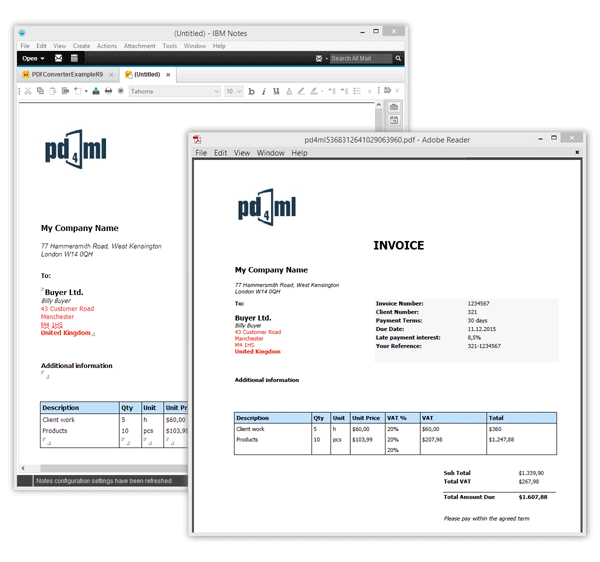
PD4ML can be used to convert IBM Notes documents to PDF (as well as to RTF or to a raster image) a variety of ways.
The most straightforward method is to capture HTML documents, returned by Notes Domino via HTTP: an URL like one of the following is to be passed to render() method of PD4ML.
http://Host/Database/PageUNID?OpenPage
(i.e. http://www.acme.com/discussion.nsf/35AE8FBFA573336A852563D100741784?OpenPage)
http://Host/Database/View/DocumentUniversalID?OpenDocument
(http://www.acme.com/leads.nsf/By+Rep/35AE8FBFA573336A852563D100741784?OpenDocument)
http://Host/Database/FormUniversalID?ReadForm
(http://www.acme.com/products.nsf/625E6111C597A11B852563DD00724CC2?ReadForm)
More IBM Notes URL syntax info…
If you run JSP infrastructure on IBM Domino server, another online method of PDF generation would be to use PD4ML JSP custom tag library (TODO).
If an online document generation method (involving HTTP, JSP etc) is undesired, there is a possibility to generate PDF documents from their XML representations (so called DXL).
DXL is an adaptation of XML used to describe, in detail, the structure and data contained in a Domino database. It describes data and design elements such as views, forms, and documents and provides a basis for importing or exporting XML representations of data to and from a Domino/Notes application.
Schematically a process of Notes document conversion to PDF can be seen like that:
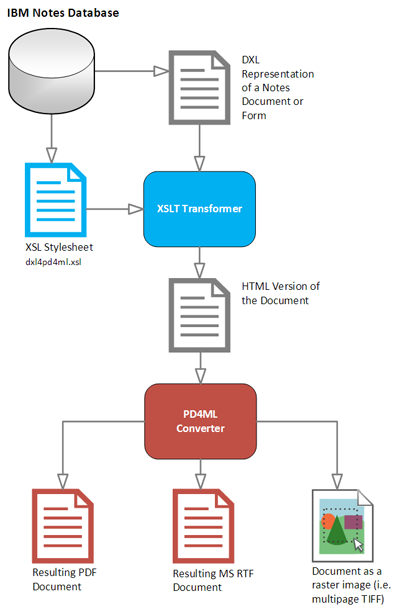
All conversion steps can be implemented at once as a IBM Lotus Notes Java agent, or can be implemented as two-step batch: DXL export request followed by a conversion with Pd4Cmd command-line tool
java -Djava.awt.headless=true -Xmx512m -jar pd4ml.jar test.dxl 1200 -xsl notesdefault
The command line overrides the default Java memory heap size limit with -Xmx512m. Here it is set to 512Mb.
On UNIX platform -Djava.awt.headless=true allows to run the application on non-graphics-enabled servers or from remote ssh/telnet sessions.
test.dxl 1200 are DXL location and htmlWidth (virtual “browser” frame width) parameters.
On Win32 the path is enclosed, if needed, to double quotes, on UNIX – to single quotes.
-xsl notesdefault applies XSL stylesheet to the input document. In the case it refers to the built-in default DXL-to-HTML XSL, but it can be an URI of an arbitrary external stylesheet.
The default PDF document format: A4 / PORTRAIT
In the example 1200px width of rendered document will be mapped to 595pt widths of A4 page format.
As long as an output file path omitted, the output is sent to STDOUTand can be piped to another application.

